Find facilities with a total revenue less than 1000

Question
Produce a list of facilities with a total revenue less than 1000. Produce an output table consisting of facility name and revenue, sorted by revenue. Remember that there's a different cost for guests and members!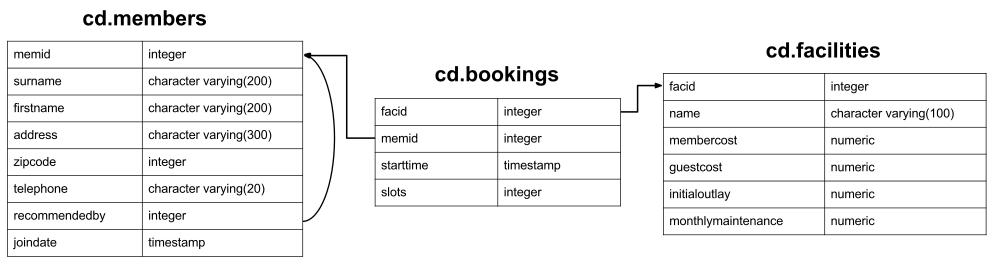
Your Answer
Answers and Discussion Show
select name, revenue from (
	select facs.name, sum(case
				when memid = 0 then slots * facs.guestcost
				else slots * membercost
			end) as revenue
		from cd.bookings bks
		inner join cd.facilities facs
			on bks.facid = facs.facid
		group by facs.name
	) as agg where revenue < 1000
order by revenue;
You may well have tried to use the HAVING keyword we introduced in an earlier exercise, producing something like below:
select facs.name, sum(case
		when memid = 0 then slots * facs.guestcost
		else slots * membercost
	end) as revenue
	from cd.bookings bks
	inner join cd.facilities facs
		on bks.facid = facs.facid
	group by facs.name
	having revenue < 1000
order by revenue;
Unfortunately, this doesn't work! You'll get an error along the lines of ERROR: column "revenue" does not exist. Postgres, unlike some other RDBMSs like SQL Server and MySQL, doesn't support putting column names in the HAVING clause. This means that for this query to work, you'd have to produce something like below:
select facs.name, sum(case
		when memid = 0 then slots * facs.guestcost
		else slots * membercost
	end) as revenue
	from cd.bookings bks
	inner join cd.facilities facs
		on bks.facid = facs.facid
	group by facs.name
	having sum(case
		when memid = 0 then slots * facs.guestcost
		else slots * membercost
	end) < 1000
order by revenue;
Having to repeat significant calculation code like this is messy, so our anointed solution instead just wraps the main query body as a subquery, and selects from it using a WHERE clause. In general, I recommend using HAVING for simple queries, as it increases clarity. Otherwise, this subquery approach is often easier to use.
Keyboard shortcuts:
- Alt-h: Show/Hide Help menu
- Alt-r: Run query
- Alt-x: Run selected text as query
- Alt-s: Run query by cursor (delimited by whitespace/semi-colon)
Other hints:
- You can double click on each of the panes of Expected Result/Your answer to quickly resize them.
- If you have trouble remembering the database schema, you can leave this popup open while you work on your answer.
- Don't forget to use the hint button if you're stuck!