List the total hours booked per named facility

Question
Produce a list of the total number of hours booked per facility, remembering that a slot lasts half an hour. The output table should consist of the facility id, name, and hours booked, sorted by facility id. Try formatting the hours to two decimal places.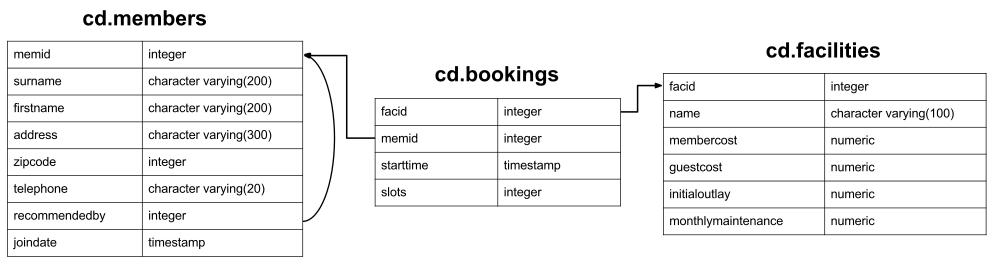
Your Answer
Answers and Discussion Show
select facs.facid, facs.name,
	trim(to_char(sum(bks.slots)/2.0, '9999999999999999D99')) as "Total Hours"

	from cd.bookings bks
	inner join cd.facilities facs
		on facs.facid = bks.facid
	group by facs.facid, facs.name
order by facs.facid;
There's a few little pieces of interest in this question. Firstly, you can see that our aggregation works just fine when we join to another table on a 1:1 basis. Also note that we group by both facs.facid and facs.name. This is might seem odd: after all, since facid is the primary key of the facilities table, each facid has exactly one name, and grouping by both fields is the same as grouping by facid alone. In fact, you'll find that if you remove facs.name from the GROUP BY clause, the query works just fine: Postgres works out that this 1:1 mapping exists, and doesn't insist that we group by both columns.
Unfortunately, depending on which database system we use, validation might not be so smart, and may not realise that the mapping is strictly 1:1. That being the case, if there were multiple names for each facid and we hadn't grouped by name, the DBMS would have to choose between multiple (equally valid) choices for the name. Since this is invalid, the database system will insist that we group by both fields. In general, I recommend grouping by all columns you don't have an aggregate function on: this will ensure better cross-platform compatibility.
Next up is the division. Those of you familiar with MySQL may be aware that integer divisions are automatically cast to floats. Postgres is a little more traditional in this respect, and expects you to tell it if you want a floating point division. You can do that easily in this case by dividing by 2.0 rather than 2.
Finally, let's take a look at formatting. The TO_CHAR function converts values to character strings. It takes a formatting string, which we specify as (up to) lots of numbers before the decimal place, decimal place, and two numbers after the decimal place. The output of this function can be prepended with a space, which is why we include the outer TRIM function.
Keyboard shortcuts:
- Alt-h: Show/Hide Help menu
- Alt-r: Run query
- Alt-x: Run selected text as query
- Alt-s: Run query by cursor (delimited by whitespace/semi-colon)
Other hints:
- You can double click on each of the panes of Expected Result/Your answer to quickly resize them.
- If you have trouble remembering the database schema, you can leave this popup open while you work on your answer.
- Don't forget to use the hint button if you're stuck!